Your cooking settings, remembered

Stop guessing how you cooked it last time.

Scan packaged foods, save the settings that worked in your appliance, and keep ingredients and portions for the dishes you make again and again.


Download on the App StoreGet it on Google Play

No account. No subscription. Your saved cooking records stay on your device.
See how it works

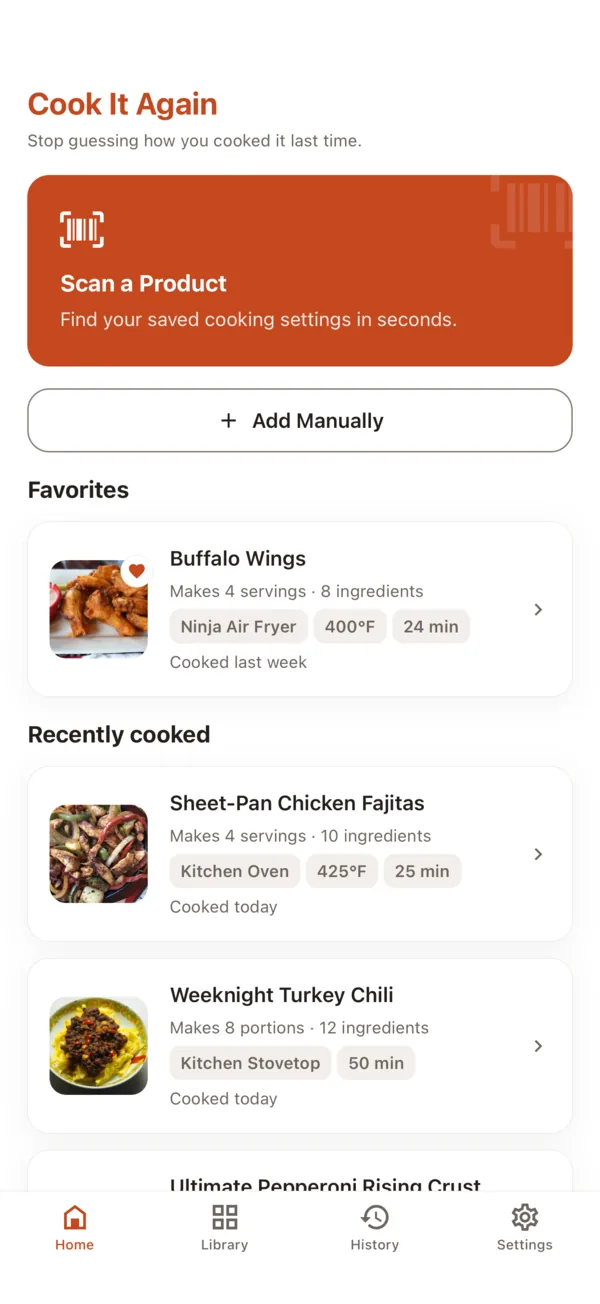
The Cook It Again home screen: a Scan a Product button, a favourite dish, and recently cooked items each showing the appliance, temperature, and time that worked.

Package directions are only a starting point.

Different appliances, batch sizes, and personal preferences produce different results. You remember it was good. You do not remember the details.

Was it 380° or 400°?

The box says one thing and your air fryer says another. Whichever worked, it is not written down anywhere.

Did I shake it at five minutes?

The step that makes the difference is the one you forget the timing of.

How much did I make?

You changed the amounts to suit the tray you actually own, and then had to work it out again.

Next time, you will know exactly what worked.

How it works

1. Scan a Product

A barcode identifies the item. If you have cooked it before, your saved settings come straight back. If you have not, you can name it yourself.

2. Save what worked

Appliance, temperature or power level, time, preheat, portion, and any timed steps — flip, shake, check. Save a different setup for every appliance you own.

3. Cook it again

Start the timer, get an alert when a step is due, and record how it turned out. The next cook starts from the setting that worked.

Packaged products

The fastest path: scan, and your own settings come back.

Scan the package. Save your version.

The barcode identifies a saved item and nothing more. Cook It Again does not read cooking directions out of a barcode — it brings back the setting you saved.

  • A barcode identifies the saved item
  • Basic name and brand lookup is optional
  • An unrecognised package can be named manually
  • Items you have already saved work offline

Your appliance. Your settings.

The same product cooks differently in an air fryer, an oven, a microwave, a grill, a toaster oven, and on a stovetop. Save a setup for each one.
  • Appliance and cooking method
  • Temperature, or power level for a microwave
  • Duration and preheat
  • Portion
  • Timed steps: flip, shake, check
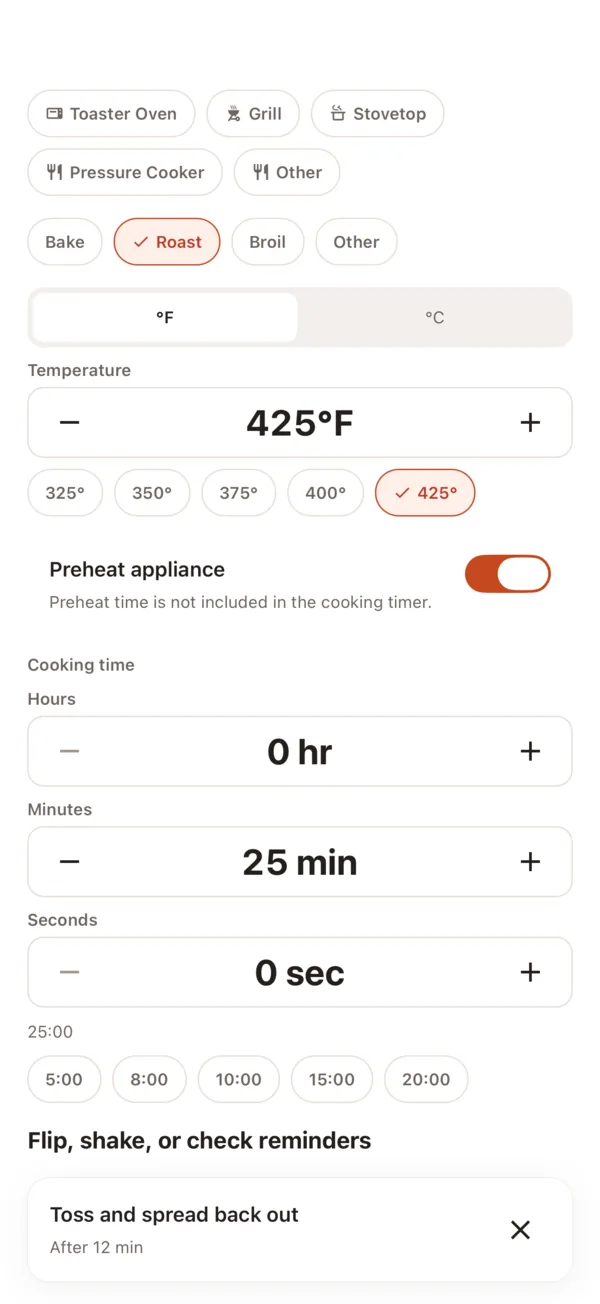
A cooking setup being saved: air fryer, 400°F, 24 minutes, preheat on, and a timed step to shake the basket.

Custom Dishes

Not everything comes in a package.

Save the dishes you make your way.

A Custom Dish is a homemade or non-barcoded dish you cook again and again. It is for remembering what you already make, not for finding something new to cook.
  • A name, and optionally a photo and a category
  • Base portions — how much the dish makes
  • An optional ingredient list, in the order you use it
  • Preparation notes
  • The same cooking setups, timers, results, and history
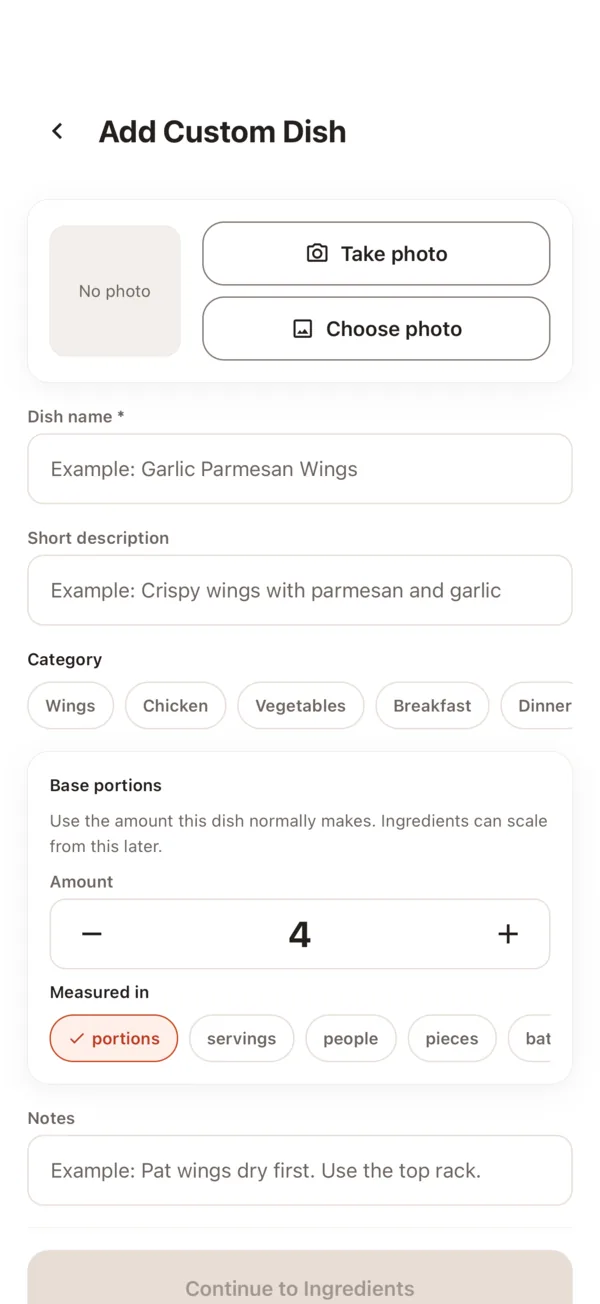
Adding a Custom Dish, with a name, a category, and the number of portions it makes.

Scale the amounts without rewriting the dish.

Cooking for twice as many? Pick 1.5×, 2×, 3×, or type the number of portions you need. The saved dish is untouched — the scaled amounts are a view for this cook.

Ingredient scaling does not automatically change cooking time, temperature, power, or timed steps.
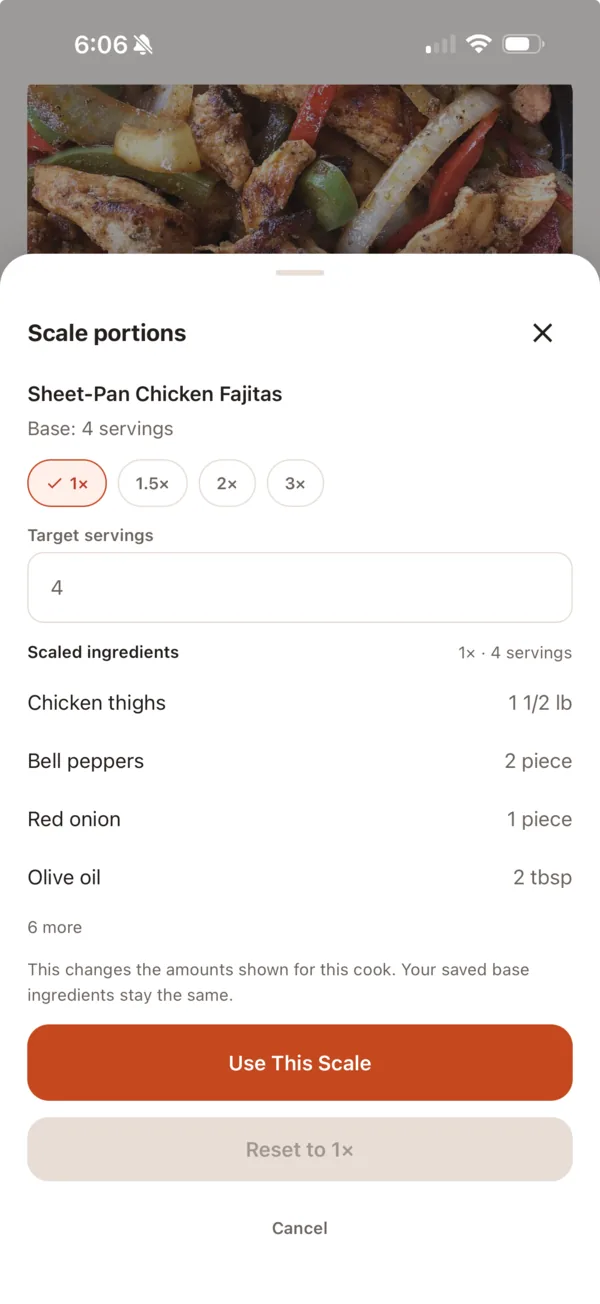
Scaling a dish to double, with the doubled ingredient amounts shown beside the saved ones.

Timers, results, and your own backup

Timers that survive a locked phone.

A cook is tracked by timestamps rather than by a counter running in the app, so the time left is right when you come back to it.

  • Local notifications for timed steps and for the finish
  • Add time to a running cook
  • Pause and resume
  • A cook still running when you reopen the app is picked back up

Alerts are scheduled with your device. Focus modes, Do Not Disturb, and battery settings can affect when your phone shows them.

Record the result. Keep the history.

Perfect, needed more time, overcooked, or something else. Cook It Again may suggest a revised time based on what actually happened — and it only changes your saved setup if you tap to accept it.

  • Every past cook keeps its own record of the settings used
  • History stays readable after you edit or delete the item
  • Cook these settings again, straight from a past cook

Nothing changes your saved setup automatically.

Local-first, with a backup you control.

Your saved records live on your device. When you want a copy, you export one file and choose where it goes — iCloud Drive, Google Drive, Files, or anywhere else you keep documents.

  • No account and no sign-in
  • One exported file holds products, dishes, ingredients, setups, history, settings, and photos
  • You choose the destination; the app does not upload it
  • Restoring a backup is always free, whether or not you have bought the unlock

Backup is a file you export and file yourself. It is not automatic sync, and purchase status is never written into it.

No account is required. Your saved cooking records live on your device, and you choose when and where to export a backup file.

Simple, honest pricing.

One optional purchase. No subscription, no monthly anything.

Free

Enough to know whether it suits you.

  • Up to 5 saved items
  • Any mix of packaged products and Custom Dishes
  • Ingredients and portion scaling included within the limit
  • Timers, results, and history
  • Restoring a backup file

Lifetime unlock

One purchase, kept for good.

  • Unlimited products and Custom Dishes
  • Portable backup export
  • Everything in the free tier

The price is shown by the App Store or Google Play in your own currency. A purchase is tied to the store account that made it, and there is no account here to move it between platforms.

What Cook It Again is not

  • No recipe discovery and no importing recipes from websites
  • No grocery lists, pantry tracking, or meal planning
  • No nutrition, calorie, or allergen information
  • No social feed and no sharing
  • No AI suggesting what to cook

It is one thing: the setting that worked, ready for next time.

Common questions

Do I need an account?
No. There is no sign-up, no login, and no password. Open the app and start saving.
Does the app work offline?
Items you have already saved, your cooking setups, timers, results, and history all work with no connection. The one thing that needs the internet is the optional lookup of a name and brand for a barcode you have never scanned before — and you can always type those in yourself.
Which appliances can I save?
Air fryer, oven, microwave, grill, toaster oven, and stovetop. You name each one, so two air fryers can have their own settings.
What can I save for free?
Up to 5 saved items in total, in any mix of packaged products and Custom Dishes. Ingredients, portion scaling, timers, results, and history are all included within that limit.

Read the full FAQ

Save what worked. Cook it again.

Download on the App StoreGet it on Google Play